Customize tables
Added in
eventcatalog@2.63.0EventCatalog allows you to customize the columns and names on the Explore page, Teams and Users pages.
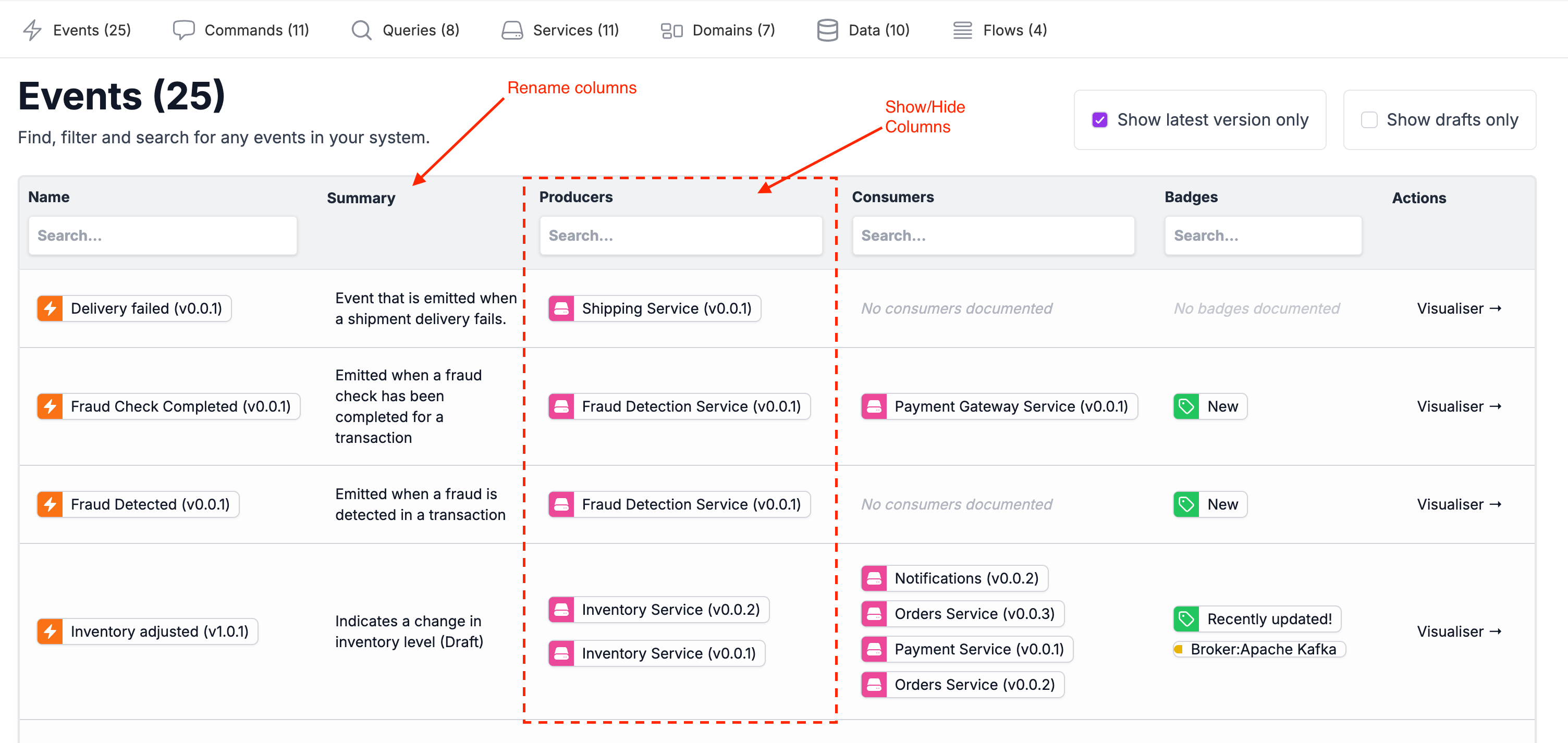
How to customize tables
You can customize the tables in EventCatalog by configuring them in your eventcatalog.config.js file.
Example of how to customize the tables for the events table page:
eventcatalog.config.js
events: {
  tableConfiguration: {
    columns: {
      name: { visible: true, label: 'Name' },
      summary: { visible: true, label: 'Summary' },
      producers: { visible: true, label: 'Producers' },
      consumers: { visible: true, label: 'Consumers' },
      badges: { visible: true, label: 'Badges' },
      actions: { visible: true, label: 'Actions' },
    }
  },
},
Configuration
List of available configuration options for the table columns:
| Option | Type | Default | Description |
|---|---|---|---|
visible | boolean | true | Whether the column is visible. |
label | string | - | The label to display for the column. |
Events, Queries and Commands Table
The key property is either events, queries, commands.
In this example we set the events table configuration.
eventcatalog.config.js
// ... other configuration ...
// change property to `events`, `queries`, `commands`
events: {
  tableConfiguration: {
    columns: {
      name: { visible: true, label: 'Name' },
      summary: { visible: true, label: 'Summary' },
      producers: { visible: true, label: 'Producers' },
      consumers: { visible: true, label: 'Consumers' },
      badges: { visible: true, label: 'Badges' },
      actions: { visible: true, label: 'Actions' },
    },
  },
}
// ... other configuration ...
Services Table
eventcatalog.config.js
// ... other configuration ...
services: {
  tableConfiguration: {
    columns: {
      name: { visible: true, label: 'Name' },
      summary: { visible: true, label: 'Summary' },
      receives: { visible: true, label: 'Receives' },
      sends: { visible: true, label: 'Sends' },
      badges: { visible: true, label: 'Badges' },
      actions: { visible: true, label: 'Actions' },
    }
  },
}
// ... other configuration ...
Domains Table
eventcatalog.config.js
// ... other configuration ...
domains: {
  tableConfiguration: {
    columns: {
      name: { visible: true, label: 'Name' },
      summary: { visible: true, label: 'Summary' },
      services: { visible: true, label: 'Owners' },
      badges: { visible: true, label: 'Badges' },
      actions: { visible: true, label: 'Actions' },
    }
  },
}
// ... other configuration ...
Data Table
eventcatalog.config.js
// ... other configuration ...
containers: {
  tableConfiguration: {
    columns: {
      name: { visible: true, label: 'Name' },
      summary: { visible: true, label: 'Summary' },
      writes: { visible: true, label: 'Writes' },
      reads: { visible: true, label: 'Reads' },
      badges: { visible: true, label: 'Badges' },
      actions: { visible: true, label: 'Actions' },
    }
  },
}
// ... other configuration ...
Flows Table
eventcatalog.config.js
// ... other configuration ...
flows: {
  tableConfiguration: {
    columns: {
      name: { visible: true, label: 'Name' },
      version: { visible: true, label: 'Version' },
      summary: { visible: true, label: 'Summary' },
      badges: { visible: true, label: 'Badges' },
      actions: { visible: true, label: 'Actions' },
    }
  },
}
// ... other configuration ...
Users Table
eventcatalog.config.js
// ... other configuration ...
users: {
  tableConfiguration: {
    columns: {
      name: { visible: true, label: 'Name' },
      ownedEvents: { visible: true, label: 'Owned Events' },
      ownedCommands: { visible: true, label: 'Owned Commands' },
      ownedQueries: { visible: true, label: 'Owned Queries' },
      ownedServices: { visible: true, label: 'Owned Services' },
      teams: { visible: true, label: 'Teams' },
      actions: { visible: true, label: 'Actions' },
    }
  },
}
// ... other configuration ...
Teams Table
eventcatalog.config.js
// ... other configuration ...
teams: {
  tableConfiguration: {
    columns: {
      name: { visible: true, label: 'Name' },]
      ownedEvents: { visible: true, label: 'Owned Events' },
      ownedCommands: { visible: true, label: 'Owned Commands' },
      ownedQueries: { visible: true, label: 'Owned Queries' },
      ownedServices: { visible: true, label: 'Owned Services' },
      actions: { visible: true, label: 'Actions' },
    }
  },
}
// ... other configuration ...
You can read the eventcatalog.config.js API reference for more information on the table configuration.